Building a Task Manager with Docker, Kubernetes, Helm and GitOps
A hands-on journey bringing Docker, CI/CD, Kubernetes, Helm, Argo CD and Terraform together in one application delivery workflow.
Building applications is one part of software engineering. Understanding how to package, automate, deploy, and manage those applications is another.
I wanted to explore that complete workflow through a practical project rather than learning each DevOps tool in isolation.
So, I built a Task Manager application and worked on connecting its application architecture with containerization, CI/CD automation, Kubernetes, Helm, and GitOps.
In this article, I'll walk through the architecture, tools, implementation, and what I learned while building the project.
Project Architecture:
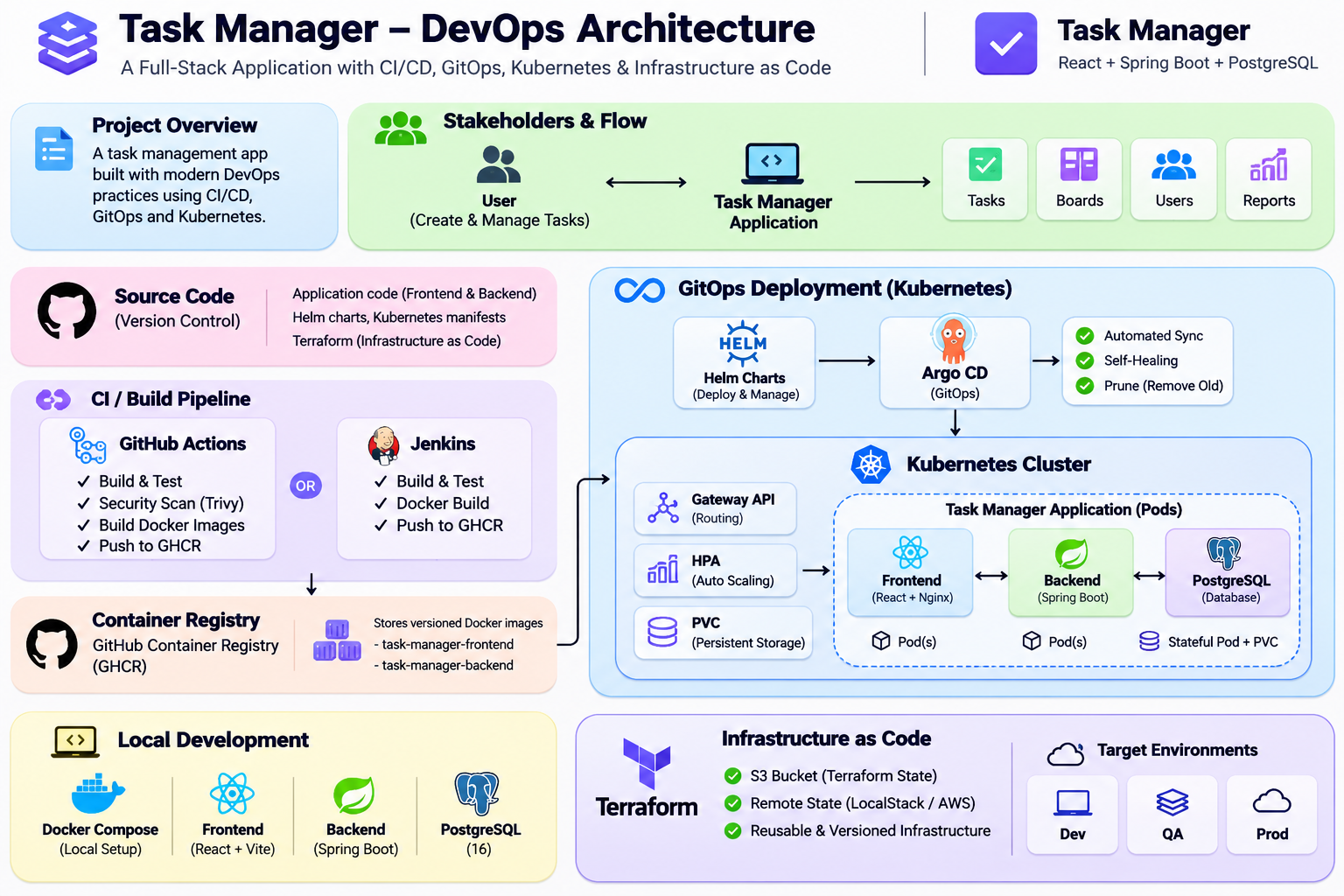
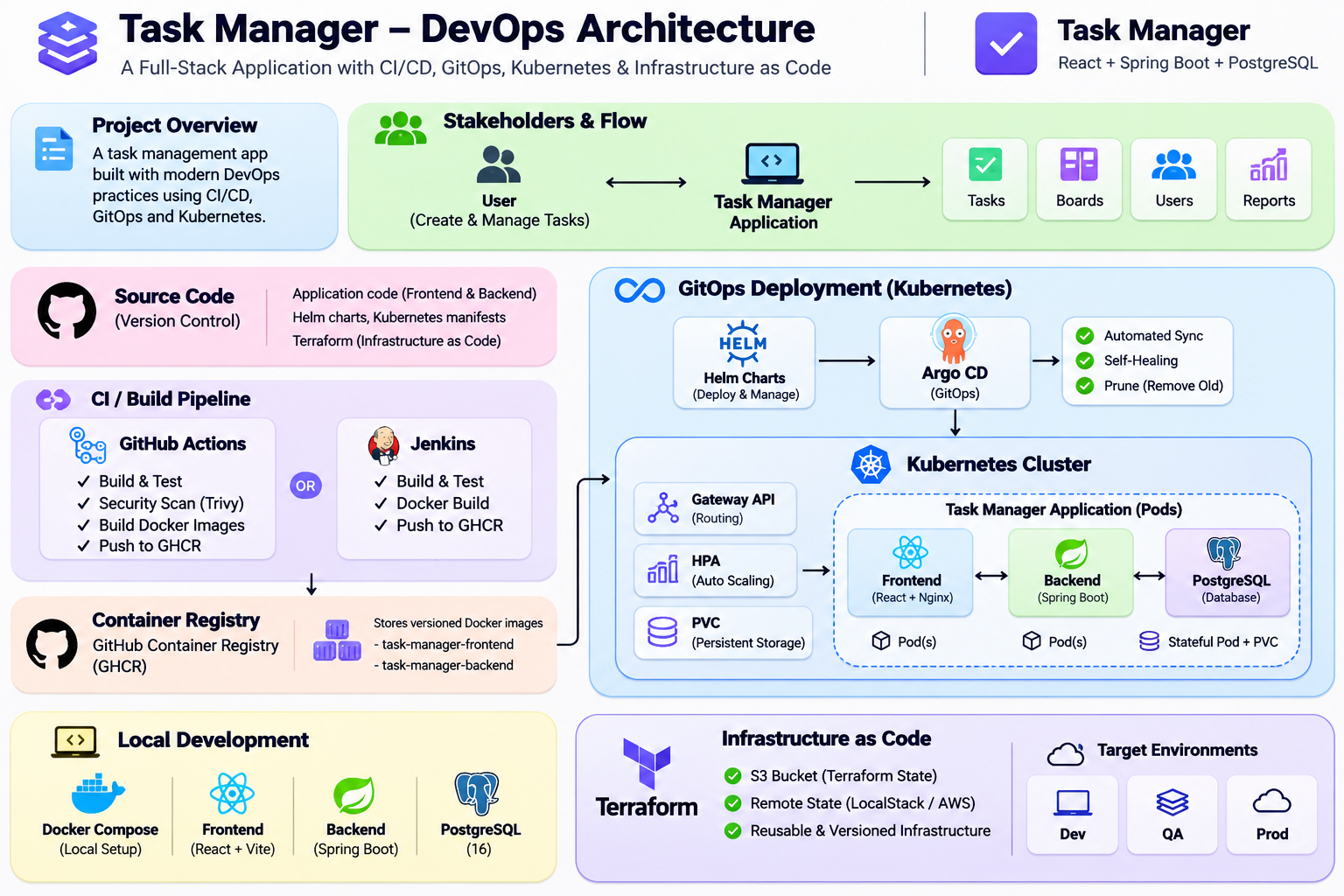
Before exploring the individual tools, let's understand how the different components of this project fit together.
The application uses a frontend, backend, and database architecture. Docker packages the application components, CI/CD automates the build and image publishing process, and Kubernetes provides the orchestration layer. Helm manages the Kubernetes configurations, while Argo CD is configured to manage deployments using GitOps.
Application Stack:
The application follows a three-tier architecture with a frontend, backend, and database.
Frontend – React and Vite
The frontend provides the user interface for managing tasks. It is built using React and Vite and packaged into a Docker image.
Backend – Java 21 and Spring Boot
The backend handles application logic and API requests. It is built with Spring Boot and communicates with the PostgreSQL database.
Database – PostgreSQL 16
PostgreSQL stores the application's task data. It runs as a separate service in the containerized application setup.
Local Development – Docker Compose
Docker Compose brings the application services together, making it easier to run and test the stack locally.
1. Project Overview: Two Repositories, One Application
I organized this project into two separate GitHub repositories to maintain a clear separation between application development and deployment configuration.
Repository 1: Task Manager Application
GitHub: https://github.com/Ashwin1808/Demo-Tasts
This repository contains the application code and the workflows used to build and package it.
Technology stack:
- Frontend: React and Vite – provides the user interface.
- Backend: Java 21 and Spring Boot – handles application logic and API requests.
- Database: PostgreSQL 16 – stores application data.
- Containerization: Docker – packages the frontend and backend into container images.
- Local environment: Docker Compose – runs the application services together.
- CI/CD: GitHub Actions and Jenkins – provides automated build and image publishing workflows.
- Container registry: GitHub Container Registry (GHCR) – stores the application images.
The main objective of this repository is to manage application development, containerization, and CI/CD automation.
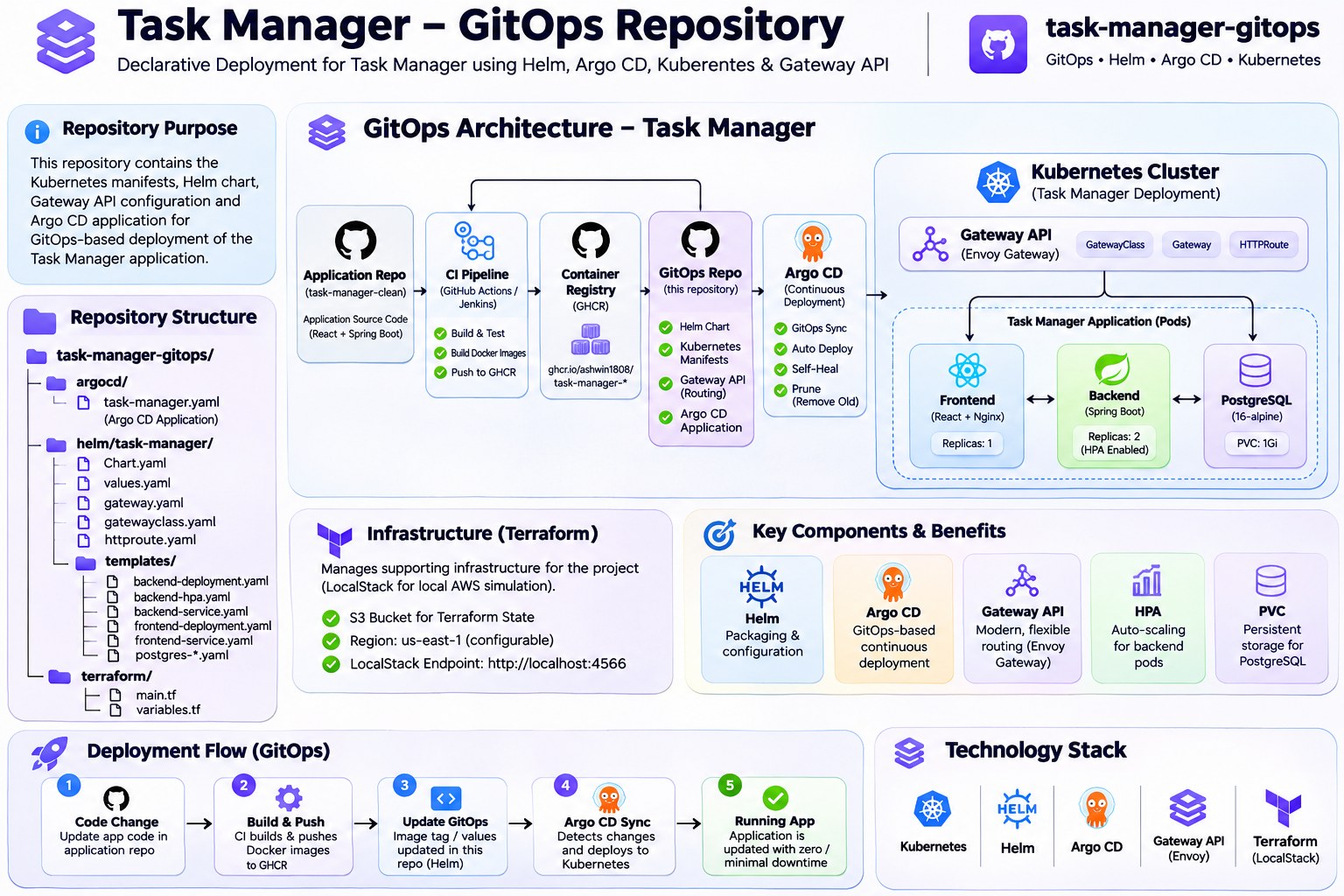
Repository 2: Task Manager GitOps
GitHub: https://github.com/Ashwin1808/task-manager-gitops
The second repository manages the Kubernetes deployment configuration separately from the application source code.
Technology stack:
- Kubernetes: Manages the application workloads.
- Helm: Packages and organizes Kubernetes resources into a reusable chart.
- Argo CD: Configured to monitor the GitOps repository and synchronize deployment configurations.
- Gateway API: Defines traffic routing to the frontend and backend services.
- ConfigMaps and Secrets: Manage application configuration and sensitive deployment values.
- PersistentVolumeClaim: Defines persistent storage for PostgreSQL.
- Horizontal Pod Autoscaler: Configures automatic backend replica scaling based on CPU utilization.
- Terraform: Defines an S3 bucket using a LocalStack-compatible endpoint for infrastructure-as-code practice.
The GitOps repository keeps deployment configuration version-controlled and independent of application source code.
How Both Repositories Work Together
The overall workflow connects application development with deployment configuration:
- Application code is maintained in the Task Manager repository.
- CI/CD workflows build and publish container images to GHCR.
- The GitOps repository contains the Helm chart and Kubernetes deployment configurations.
- Argo CD is configured to monitor the GitOps repository.
- Kubernetes resources are rendered through Helm and can be synchronized by Argo CD when the required cluster components are available.
This separation makes the application code and deployment configuration easier to maintain independently.
Important: The Helm chart passed lint validation and successfully rendered 13 Kubernetes resources. This confirms the configuration validation, not a completed live Kubernetes deployment.
Containerization and CI/CD Automation:
Containerizing the Application with Docker
I used Docker to package the application components into container images, making them easier to run consistently across environments.
The application consists of three main components:
- Frontend: React and Vite application.
- Backend: Java 21 and Spring Boot application.
- Database: PostgreSQL 16.
Docker Compose is used to define and run the application services together during local development.
Automating Builds with GitHub Actions
I used GitHub Actions to automate the application build and container image publishing workflow.
The pipeline is designed to:
- Retrieve the application source code.
- Build the application components.
- Build Docker images.
- Publish the images to GitHub Container Registry (GHCR).
This reduces repetitive manual work and provides a consistent image-building workflow.
Jenkins CI/CD
I also worked with Jenkins to implement an alternative CI/CD pipeline.
Working with both GitHub Actions and Jenkins helped me understand different approaches to pipeline configuration and automation.
Container Image Management
The application images are published to GitHub Container Registry.
The GitOps repository references these images using versioned image tags, allowing the deployment configuration to specify which application image should be used.
This connects the application build process with the deployment configuration maintained separately in the GitOps repository.
Kubernetes, Helm and GitOps with Argo CD:
Deploying the Application with Kubernetes
I organized the Kubernetes resources in the Task Manager GitOps repository to manage the frontend, backend, and PostgreSQL components.
The configuration includes:
- Deployments: Define the frontend, backend, and PostgreSQL workloads.
- Services: Provide internal communication between application components.
- ConfigMaps: Store backend application configuration.
- Secrets: Provide database credentials to the backend.
- PersistentVolumeClaim: Requests persistent storage for PostgreSQL.
- Horizontal Pod Autoscaler: Configures backend scaling based on CPU utilization.
The backend HPA is configured with a minimum of 2 replicas, a maximum of 5 replicas, and a target CPU utilization of 70%.
Packaging Kubernetes Resources with Helm
Instead of maintaining the deployment resources as unrelated YAML files, I organized them into a Helm chart.
The chart includes templates for:
- Frontend Deployment and Service
- Backend Deployment and Service
- PostgreSQL Deployment, Service and PVC
- ConfigMap and Secret
- Backend Horizontal Pod Autoscaler
- Gateway, GatewayClass and HTTPRoute
I validated the chart using Helm:
helm lint ./helm/task-manager
The lint command completed successfully with zero failures.
I also rendered the Kubernetes manifests:
helm template task-manager ./helm/task-manager \
  --namespace task-manager
The command successfully rendered 13 Kubernetes resources.
GitOps Workflow with Argo CD
I created an Argo CD Application manifest in the GitOps repository.
It references the GitHub repository and uses the Helm chart located at:
helm/task-manager
The Argo CD Application is configured with:
- Automated synchronization
- Automatic pruning
- Self-healing
- Namespace creation
This configuration allows Argo CD to use Git as the source of truth for the desired deployment configuration.
The configuration is committed to GitHub, making deployment changes version-controlled and reviewable.
Traffic Routing with Kubernetes Gateway API
I also added Kubernetes Gateway API resources to define how incoming traffic should reach the application services.
The configuration includes:
- GatewayClass: References the Envoy Gateway controller.
- Gateway: Defines the HTTP listener on port 80.
- HTTPRoute: Defines routing rules for application traffic.
The HTTPRoute sends:
/apitraffic to the backend service on port 8080./traffic to the frontend service on port 8080.
The Gateway API CRDs and compatible controller must be installed in the Kubernetes cluster before these resources can operate.
This setup demonstrates how application deployment and traffic routing configuration can be maintained together in the GitOps repository.
Infrastructure as Code with Terraform:
I included Terraform in the GitOps repository to practice defining infrastructure through code.
The Terraform configuration defines an S3 bucket using an AWS provider configured with a LocalStack-compatible endpoint.
The configuration includes:
- AWS provider configuration
- Region variables
- S3 bucket resource
- Resource tags
- Terraform dependency lock file
The configuration is intended for LocalStack-compatible testing rather than claiming a live AWS deployment.
This helped me understand how infrastructure resources can be declared, managed, and version-controlled using Terraform.
Configuration Validation:
During the project, I used command-line validation to check the deployment configuration.
Helm lint
helm lint ./helm/task-manager
Result: 1 chart linted, 0 charts failed.
Helm template rendering
helm template task-manager ./helm/task-manager \
  --namespace task-manager
Result: Successfully rendered 13 Kubernetes resources.
These checks helped identify configuration issues before attempting deployment to a Kubernetes cluster.
Key Learnings and Challenges:
Building this project helped me understand how different DevOps tools fit into a complete application delivery workflow.
Some of my key learnings were:
- Separating application source code from deployment configuration using two Git repositories.
- Building and publishing container images through CI/CD workflows.
- Organizing Kubernetes manifests into reusable Helm charts.
- Understanding GitOps principles and Argo CD synchronization.
- Configuring Gateway API resources for frontend and backend routing.
- Defining infrastructure resources through Terraform.
- Validating Helm configurations before deployment.
One important lesson was that successful configuration validation does not automatically mean a workload has been deployed successfully. Live cluster validation is a separate step.
What's Next?:
This project is an ongoing learning journey. My next focus is to move beyond configuration validation and work toward a complete deployment in a Kubernetes environment.
Some of the areas I plan to explore further include:
- Deploying the application to a Kubernetes cluster.
- Validating the complete Argo CD synchronization workflow.
- Configuring and testing Gateway API traffic routing.
- Improving monitoring and observability with Prometheus and Grafana.
- Exploring AWS infrastructure and cloud deployment.
My goal is to keep improving the project while documenting the practical challenges and lessons along the way.
Project Repositories
I've maintained two separate repositories to keep the application code and deployment configurations organized.
1. Application Repository
Contains the application source code, Docker configuration, and CI/CD pipeline setup.
https://github.com/Ashwin1808/Demo-Tasts
2. GitOps Repository
Contains Kubernetes manifests, Helm charts, Argo CD configuration, Gateway API resources, and Terraform configuration.
https://github.com/Ashwin1808/task-manager-gitops
Both repositories are available publicly for anyone interested in exploring the implementation.
About the author
- DevOps and Cloud Engineer with experience in cloud infrastructure, containerization, CI/CD automation, Kubernetes orchestration, Infrastructure as Code and cloud-native application deployment. Hands-on experience working with AWS services including EC2, IAM, S3, VPC and EKS, along with Docker, Kubernetes, Terraform, Jenkins, GitHub Actions, Helm and Argo CD. Familiar with GitOps workflows, DevSecOps practices, container image security, vulnerability scanning, infrastructure automation and application deployment troubleshooting. Technical exposure includes Linux administration, Shell Scripting, Git, Python, AWS networking, Kubernetes networking, Prometheus, Grafana and Alertmanager. Experienced in collaborating with development, QA and product teams, with an additional background in UI/UX design and enterprise application development workflows. Interested in DevOps Engineer, Cloud Engineer, AWS DevOps Engineer, Kubernetes Engineer, Platform Engineer and Junior DevSecOps Engineer opportunities.
Comments
Join the discussionNo comments yet. Be the first to comment.